WLAN Operation
802.11 Wireless Topology Modes
Wireless LANs can accommodate multiple network topologies. The 802.11 standard identifies 3 primary wireless topology modes:
Ad hoc Mode

This is when two devices connect wirelessly in a peer-to-peer (P2P) manner without using APs or wireless routers. Examples include wireless clients connecting directly to each other using Bluetooth or Wi-Fi Direct. The IEEE 802.11 standard refers to an ad hoc network as an independent basic service set (IBSS).
Infrastructure Mode
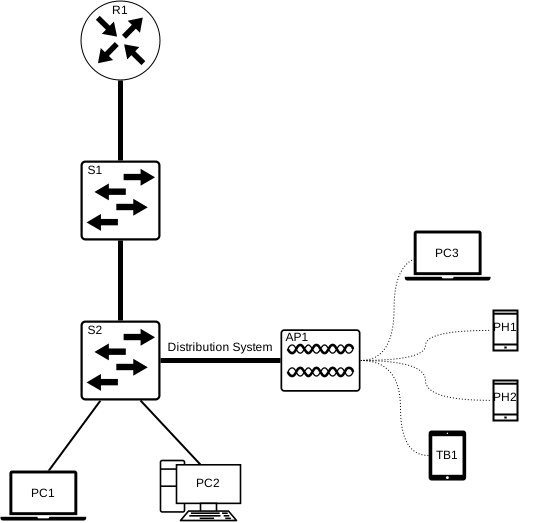
This is when wireless clients connect via a Wireless router on an Access Point, ex.WLANs. Access points connect to the infrastructure using the wired distribution system ex. Ethernet
Tethering Mode

Similar to ad hoc topology. This is when a smart-phone or a tablet with cellular data access is configured to create what we all know as a personal hotspot (aka. Tethering)
This is usually used as a quick solution to access the internet from a laptop when there is no WiFI around.
BSS and ESS
BSS (Basic Service Set)
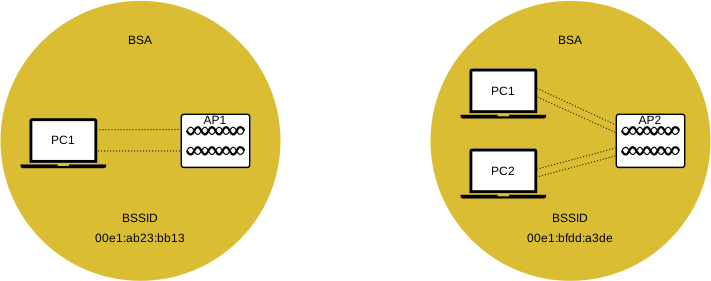
A Basic Service Set consists of a single Access Point connected to all associated wireless clients. If a wireless client moves out of its BSA (Basic Service Area), it will no longer be able to directly communicate with other wireless clients within the BSA.
The Layer 2 MAC Address of the Access Point is used to identify each BSS (Basic Service Set), which is known as the BSSID (Basic Service Set Identifier). The BSSID is the formal name of the BSS and is always associated with only one Access Point.
ESS (Extended Service Set)
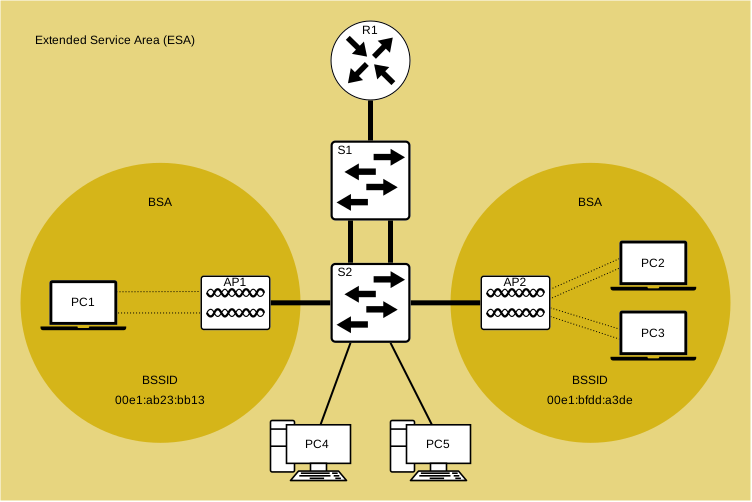
When a single BSS (Basic Service Set) does not provide enough coverage, multiple BSSs can be joined via a common distribution system (DS) into an ESS (Extended Service Set). An ESS is a union of multiple BSSs connected via a wired Distribution System. Each ESS is identified by an SSID and each BSS is identified by a BSSID.
Wireless clients in one BSA is now able to communicate with wireless clients in another BSA within the same ESS.
Roaming clients will be able to move from one BSA to another BSA within the same ESS seamlessly and stay connected.
802.11 Frame Structure
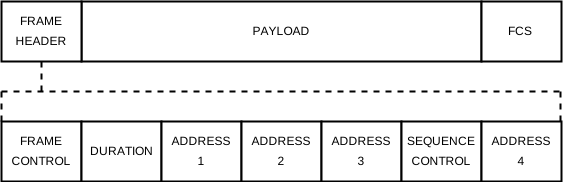
As you already know, all Layer 2 frames consist of a header, a payload, and an FCS (Frame Check Sequence).
The 802.11 frame is similar to the Ethernet frame, but it contains more fields as follows:
| Frame Control |
| Identifies the type of wireless frame and also contains subfields for protocol version, frame type, address type, power management, and security settings. |
| Duration |
| Used to indicate the remaining time needed to receive the next frame. |
| Address 1 |
| Usually contains the MAC address of the receiving wireless device or Access Point. |
| Address 2 |
| Usually contains the MAC address of the transmitting wireless device or Access Point. |
| Address 3 |
| Sometimes contains the MAC address of the destination, such as the router interface (default gateway) of which the Access Point is attached to. |
| Sequence Control |
| Contains information to control sequencing and fragmented frames. |
| Address 4 |
| Used in ad hoc mode and is usually blank. |
| Payload |
| The DATA Container. |
| FCS |
| Used for Layer 2 error control and error-checking. |
CSMA/CA
Carrier Sense Multiple Access with Collision Avoidance
As explained earlier, WLANs operate in half-duplex, shared media configurations. This creates a problem because a wireless client cannot listen while sending, making it impossible to detect a collision.
To resolve such issues, WLANs use CSMA/CA (Carrier Sense Multiple Access with Collision Avoidance) as a method to determine when and how to transfer the data on a network. A wireless connected client will go through the following 6 steps:
- Listens to the channel to determine if it’s idle or not, in other words, to check if there is any other traffic currently on the channel. Such a channel is known as the carrier.
- Sends an RTS (Ready to Send) Message to the Access Point to request access to the network.
- Receives a CTS (Clear to Send) Message from the Access Point granting access to send.
- If the client won’t receive a CTS Message, it will wait for a random amount of time and then restart the process.
- After a CTS is received, the client will transmit the data.
- All transmissions are acknowledged (ACKed). If the client does not receive such acknowledgment, it will assume that a collision occurred and will restart the whole process.
Wireless Client and AP Association
For wireless devices to communicate over a network, they must primarily associate with an Access Point or a Wireless Router. A crucial part of the 802.11 processes is discovering a WLAN and connecting to it. Wireless devices go through a 3 stage process to connect to a wireless Access Point and/or router:
- Discover a wireless AP
- Authenticate with AP
- Associate with AP
In order for a successful association, a wireless client and an Access Point must agree on specific parameters.
Such parameters must then be configured on the Access Point/Router followed by the client to negotiate a successful association. The parameters are detailed below:
| SSID |
| The SSID is the name of the Access Point that appears in the list of available networks for the end-client. In larger networks using multiple VLANs to segment traffic, each SSID is mapped to one particular VLAN. Multiple Access Points can share one common SSID and seamless roaming, of course depending on the network configuration. |
| Password |
| Required to be entered by the user on the end wireless client to authenticate to the Access Point. |
| Network Mode |
| This refers to the 802.11a/b/g/n/ac/ad WLAN standards. Access Points and Wireless routers can operate in a Mixed-mode and simultaneously support clients connecting via different standards. |
| Security Mode |
| This refers to the security parameter settings/encryption, such as WEP, WPA, WPA2, OR WPA2 Enterprise. Always update the firmware of your wireless equipment and enable the highest level of security supported. |
| Channel Settings |
| This portrays the frequency bands used to transmit the wireless data. Routers and Access Points are able to scan the radio frequency channels and automatically select a proper channel setting. Such a channel can also be configured manually if there is interference with other wireless devices. |
Passive and Discover Modes
Passive Mode
In Passive Mode, the Access Point publicly advertises its service by periodically sending broadcast beacon frames containing the SSID, supported standards, and security settings.
The reason/purpose for such beacon is to allow wireless clients to learn which networks and Access Points are available in the area.
After populating the list of available networks, a wireless client can choose which network and AP to connect to and use.
Active Mode
When in Active Mode, the Access Point will no longer publicly advertise its service, therefore wireless clients must know the SSID.
A wireless client starts the process by broadcasting what’s called a probe request frame on multiple channels. This request will contain the SSID Name and Standards supported.
Access Points configured with the SSID will reply with a probe response that includes the SSID, Standards supported and security settings.
Such a mode may be required if an Access Point or a Wireless Router is configured not to broadcast beacon frames.
A wireless client can also send a probe request without an SSID to discover nearby WLAN networks. Access Points configured to broadcast beacon frames will reply to the wireless client with a probe response and provide the SSID name.
If an Access Point is configured not to broadcast SSID, it will simply not respond. Sometimes this is switched off for security reasons.