IPv4/IPv6 Fully Specified Static Routes
When a Fully Specified Static Route is configured, both the “Exit Interface” and also the “Next-Hop IP Address” are specified. This method of Static Route is usually used when the exit interface is a multi-access interface and it is required to explicitly identify the Next-Hop. The Next-Hop must be directly connected to the specified exit interface. Using an exit interface is optional, but it is required to use a Next-Hop Address.
It is highly recommended that when the exit interface is an Ethernet network, the static route includes a next-hop address.
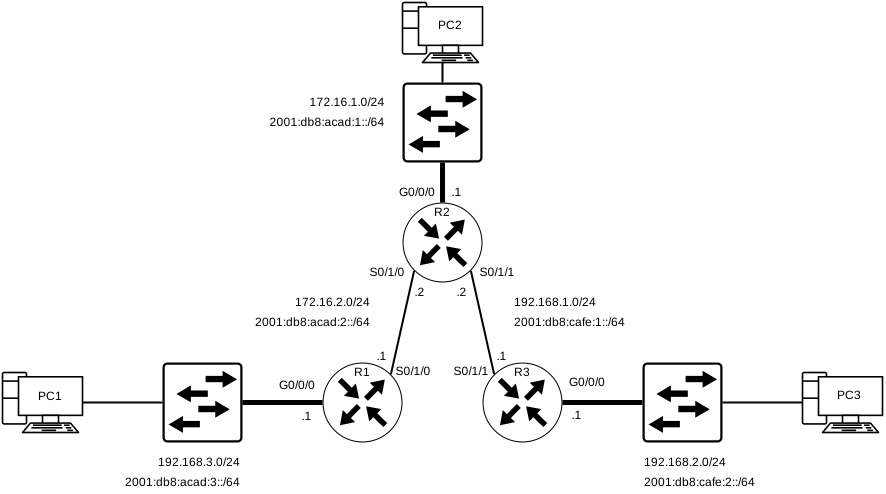
The same topology will be used as a reference; The following are the commands used to configure R1 with the IPv4 Static Routes to the three remote networks, this time using the “Fully Specified” method as per below:
Configuration on R1 to the 3 Remote networks (IPv4)
R1(config)# ip route 172.16.1.0 255.255.255.0 GigabitEthernet 0/0/1 172.16.2.2
R1(config)# ip route 192.168.1.0 255.255.255.0 GigabitEthernet 0/0/1 172.16.2.2
R1(config)# ip route 192.168.2.0 255.255.255.0 GigabitEthernet 0/0/1 172.16.2.2
Below is a representation of the IPv4 Routing Table on R1 after the Fully Specified Static Route Configuration was applied:
This IPv4 Routing Table for R1 can show us that when a packet is intended for the 192.168.2.0/24 network, R1 will look for a match in its Routing Table, and finds that it can forward the traffic out of its Serial 0/1/0 Interface.
Post Static Route Configuration Routing Table on R1 (IPv4)
R1# show ip route | begin Gateway
Gateway of last resort is not set
      172.16.0.0/16 is variably subnetted, 5 subnets, 2 masks
S        172.16.1.0/24 [1/0] via 172.16.2.2, GigabitEthernet0/0/1
C        172.16.2.0/24 is directly connected, GigabitEthernet0/0/1
L        172.16.2.1/32 is directly connected, GigabitEthernet0/0/1
C        172.16.3.0/24 is directly connected, GigabitEthernet0/0/0
L        172.16.3.1/32 is directly connected, GigabitEthernet0/0/0
S     192.168.1.0/24 [1/0] via 172.16.2.2, GigabitEthernet0/0/1
S     192.168.2.0/24 [1/0] via 172.16.2.2, GigabitEthernet0/0/1
R1#
[NOTE] Using a next-hop address is generally recommended. Directly connected static routes should only be used with point-to-point serial interfaces.
When using a fully specified IPv6 Static Route, both the exit and the Next-Hop IPv6 addresses needs to be specified. There is a situation in IPv6 when a fully specified Static Route must be used.
If the IPv6 Static Route uses an IPv6 link-local address as the Next-Hop address, use a fully specified Static Route.
The reason a fully specified Static Route must be used is that IPv6 Link-Local addresses are not contained in the IPv6 Routing Table. The Link-Local addresses are only unique on a given network or link. The Next-Hop Link-Local Address may be a valid address on multiple networks connected to the Router, thus it’s necessary to include the exit interface.
The following is an example of a Fully Specified IPv6 Route configured using the Link-Local address of a Router as the Next-Hop Address. IOS Requires that an exit interface is specified.
Configuration on R1 to the 3 Remote networks (IPv6)
R1(config)# ipv6 route 2001:db8:acad:1::/64 fe80::2
%Interface has to be specified for a link-local nexthop
R1(config)# ipv6 route 2001:db8:acad:1::/64 s0/1/0 fe80::2
[NOTE] It’s crucial to always enable IPv6 unicast-routing when configuring anything IPv6 related
Below is a representation of the IPv6 Routing Table on R1 after the Static Route Configuration was applied; Note that both the next-hop link-local address and the exit interface are included.
Post Static Route Configuration Routing Table on R1 (IPv6)
R1# show ipv6 route static | begin 2001:db8:acad:1::/64
S   2001:DB8:ACAD:1::/64 [1/0]
    via FE80::2, Seria0/1/0