IPv4/IPv6 Directly Connected Static Routes
Another Static Route option is to use the “Exit Interface” to specify the Next-Hop Address.
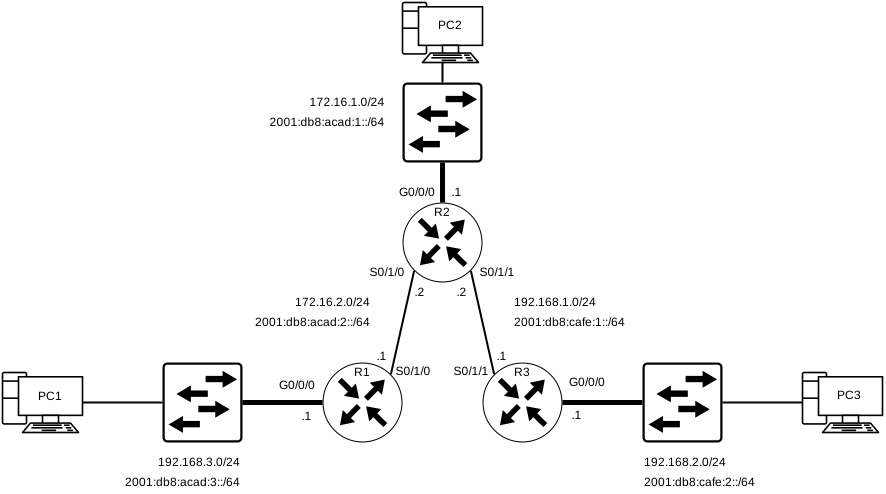
The same topology will be used as a reference; The following are the commands used to configure R1 with the IPv4 Static Routes to the three remote networks, this time using the “Exit Interface” method as per below:
Configuration on R1 to the 3 Remote networks (IPv4)
R1(config)# ip route 172.16.1.0 255.255.255.0 s0/1/0
R1(config)# ip route 192.168.1.0 255.255.255.0 s0/1/0
R1(config)# ip route 192.168.2.0 255.255.255.0 s0/1/0
Below is a representation of the IPv4 Routing Table on R1 after the Static Route Configuration was applied:
This IPv4 Routing Table for R1 can show us that when a packet is intended for the 192.168.2.0/24 network, R1 will look for a match in its Routing Table, and finds that it can forward the traffic out of its Serial 0/1/0 Interface.
Post Static Route Configuration Routing Table on R1 (IPv4)
R1# show ip route | begin Gateway
Gateway of last resort is not set
      172.16.0.0/16 is variably subnetted, 5 subnets, 2 masks
S        172.16.1.0/24 is directly connected, Serial0/1/0
C        172.16.2.0/24 is directly connected, Serial0/1/0
L        172.16.2.1/32 is directly connected, Serial0/1/0
C        172.16.3.0/24 is directly connected, GigabitEthernet0/0/0
L        172.16.3.1/32 is directly connected, GigabitEthernet0/0/0
S        192.168.1.0/24 is directly connected, Serial0/1/0
S        192.168.2.0/24 is directly connected, Serial0/1/0
R1#
[NOTE] Using a next-hop address is generally recommended. Directly connected static routes should only be used with point-to-point serial interfaces.
Below is the same exact configuration but for IPv6:
Configuration on R1 to the 3 Remote networks (IPv6)
R1(config)# ipv6 unicast-routing
R1(config)# ipv6 route 2001:db8:acad:1::/64 s0/1/0
R1(config)# ipv6 route 2001:db8:cafe:1::/64 s0/1/0
R1(config)# ipv6 route 2001:db8:cafe:2::/64 s0/1/0
[NOTE] It’s crucial to always enable IPv6 unicast-routing when configuring anything IPv6 related
Below is a representation of the IPv6 Routing Table on R1 after the Directly Connected Static Route Configuration was applied:
Post Static Route Configuration Routing Table on R1 (IPv6)
R1# show ipv6 route
IPv6 Routing Table - default - 8 entries
Codes: C - Connected, L - Local, S - Static, U - Per-user Static route
       B - BGP, R - RIP, H - NHRP, I1 - ISIS L1
       I2 - ISIS L2, IA - ISIS interarea, IS - ISIS summary, D - EIGRP
       EX - EIGRP external, ND - ND Default, NDp - ND Prefix, DCE - Destination
       NDr - Redirect, RL - RPL, O - OSPF Intra, OI - OSPF Inter
       OE1 - OSPF ext 1, OE2 - OSPF ext 2, ON1 - OSPF NSSA ext 1
       ON2 - OSPF NSSA ext 2, la - LISP alt, lr - LISP site-registrations
       ld - LISP dyn-eid, lA - LISP away, le - LISP extranet-policy
       a - Application
S   2001:DB8:ACAD:1::/64 [1/0]
     via Serial0/1/0, directly connected
C   2001:DB8:ACAD:2::/64 [0/0]
     via Serial0/1/0, directly connected
L   2001:DB8:ACAD:2::1/128 [0/0]
     via Serial0/1/0, receive
C   2001:DB8:ACAD:3::/64 [0/0]
     via GigabitEthernet0/0/0, directly connected
L   2001:DB8:ACAD:3::1/128 [0/0]
     via GigabitEthernet0/0/0, receive
S   2001:DB8:CAFE:1::/64 [1/0]
     via Serial0/1/0, directly connected
S   2001:DB8:CAFE:2::/64 [1/0]
     via Serial0/1/0, directly connected
L   FF00::/8 [0/0]
     via Null0, receiveIPv6 Routing Table - default - 8 entries
R1#