IP Routing Table
Route Sources
How does a router determine where it can forward packets? It creates what we know as a “Routing Table” that is based on the network in which it is located.
The Routing Table contains a list of routes to known networks containing both prefixes and prefix-lengths. The source of such information is obtained from the following:
- Directly connected networks
- Static routes
- Dynamic routing protocols
In routing tables, sources will always be defined by a specific code. Such code identifies how the route was learned. The following are some of the most common codes:
| L |
| An “L” represents an address assigned directly to a Router Interface. This will allow the Router to easily know when it receives a packet for an interface rather than being forwarded. |
| C |
| A “C” represents a directly connected network. |
| S |
| An “S” represents a Static Route created to reach a specific network. |
| O |
| An “O” represents a Route learned dynamically via the OSPF Routing Protocol. |
| * |
| An “*” represents a default route |
Routing Table Principles
There are 3 routing table principles as explained in the table below. The following are issues that are addressed by the proper configuration of Static Routes or Dynamic Routing Protocols on all the Routers between source and destination devices.
| Principle 1 |
| Every Router makes its own decisions alone, based on the information it has in its Routing Table. |
| Example |
| Router 1 can only forward packets using its own Routing Table. Router 1 does not know what routes are in the Routing Tables of other Routers. |
| Principle 2 |
| The information in a Routing Table of one Router does not necessarily match the Routing Table of another Router. |
| Example |
| It might be the case where Router 1 has a Route in its routing table to a network on the internet via Router 2, but this does not mean that Router 2 knows about that same network. |
| Principle 3 |
| Route information about a path does not provide return routing information. |
| Example |
| Router 1 receives a packet with the destination IP Address of PC1 and the source IP Address of PC3. R1 knows how to forward the packet out of one of its interfaces, but it does not necessarily mean that it also knows how to forward packets originating from PC1 back to the remote network of PC3. |
Routing Table Entries
It is of utmost importance to know how to interpret and decipher the information in an IPv4 and/or an IPv6 Routing Tables.
The figure below shows an example of IPv4 and IPv6 Routing Table entries on a Router (R1) for the Route to remote network 192.168.4.0/24 and 2001:db8:acad:4::/64. Both Routes were learned dynamically using the OSPF Protocol.
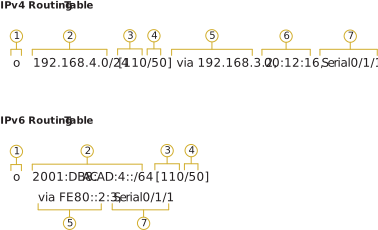
| 1 (Route Source) |
| This represents the way the route was learned. |
| 2 Destination Network (Prefix / Prefix Length) |
| This Identifies the address of the remote network. |
| 3 Administrative Distance |
| This shows the trustworthiness of the Route source. Lower values represent preferred Route Sources. |
| 4 Metric |
| This represents the value assigned to reach the remote network. Again, lower values represent preferred Routes. |
| 5 Next-Hop |
| This represents the IP Address of the Next-Hop Router to which the packet will be forwarded. |
| 6 Route Timestamp |
| This represents how much time was elapsed since the Route was learned. |
| 7 Exit Interface |
| This represents the egress interface on which the outgoing packets will go through to reach their final destination. |
[NOTE] The prefix length of the destination network represents the minimum number of far-left bits that must match between the IP Address of such packet and the destination network (prefix) for the route to be used.
Directly Connected Networks
Prior to learning about any remote networks, a Router must have at least one active interface configured with an IP Address and a proper subnet-mask (prefix length). Such Route is usually referred to as a Directly Connected Network or Route. Routers add Directly Connected Routes to its Routing table when an interface is configured with an IP Address and is activated.
A Directly Connected Network is identified by a status code of C (Directly Connected) in the Routing Table. The Route contains a network prefix and also a prefix length.
The Routing Table also contains a local Route for each of its Directly Connected Networks, identified by a status code of L (Local). This is the IP Address that was assigned on the interface on that Directly Connected network.
For IPv4 local Routes, the prefix length is /32 and for IPv6 Local Routes it is /128. This means that the destination IP Address of the packet must match all the bits in the Local Route for such Route to be a match.
The main purpose of the Local Route is to efficiently determine when it receives a packet for the interface instead of a packet to be forwarded.
Static Routes
Once Directly Connected Interfaces are configured and added to the Routing Table, Static or Dynamic Routing can be used for accessing remote networks.
Static Routes are manually configured Routes. They represent an explicit path between two networking devices. Static routes are not automatically updated and must be manually reconfigured if the topology changes, therefore a Dynamic Routing Protocol Route will automatically update.
The benefits of Static Routes include improved security and Resource Efficiency. Static Routes use less bandwidth than dynamic ones, and no CPU cycles are required to calculate and communicate Routes together. The disadvantage of Static Routes is the need of manual intervention and no automatic reconfiguration in case the topology changes.
Static Routing has 3 primary uses as per below:
| Static Routing provides ease of Routing Table Maintenance in smaller networks that are not expected to grow significantly and change continuously. |
| Static Routing uses a single default Route to represent a path to any network that does not have a more specific match with another Route in the Routing Table. To send traffic to any destination beyond the next upstream Router, Default Routes will be used. |
| Static Routing, Routes to and from stub networks. A stub network is a network that is accessed by one single route, and the Router has only one neighbor. |
The figure below shows an example of stub networks. Notice that any network attached to R1 would only have one way to reach other destinations, whether to networks attached to R2, or to destinations beyond R2. This means that networks 10.0.1.0/24 and 10.0.2.0/24 are stub networks and R1 is a stub router.
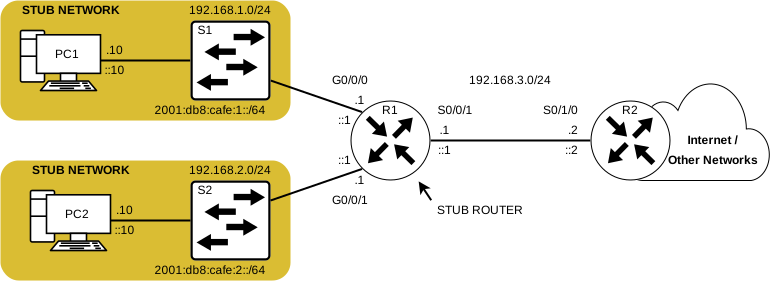
Here, a static route can be configured on R2 to reach the R1 Networks.
Also, since R1 has only one way to forward non-local traffic, a Default Static Route can be configured on R1 to point to R2 its next hop for all the other networks.
The following is an example of a static route configuration on R1 to reach the 192.168.10.0/24 and 2001:db8:cafe:10::/64 networks on R2.
A Static Route Example Configuration on R1 to reach networks beyond R2 (IPv4)
R1(config)# ip route 192.168.10.0 255.255.255.0 192.168.11.2
This configuration on R1 will be able to reach the network 192.168.10.0/24 beyond R2 using the IPv4 address of the next-hop router 192.168.11.2
A Static Route Example Configuration on R1 to reach networks beyond R2 (IPv6)
R1(config)# ipv6 route 2001.db8.cafe.10::/64 2001.db8.cafe.11::2
This configuration on R1 will be able to reach the network 2001.db8.cafe.10::/64 beyond R2 using the IPv6 address of the next-hop router 2001.db8.cafe.11::2
Dynamic Routing Protocols
Rather than configuring Static Routes, Dynamic Routing Protocols are used by Routers to automatically share and obtain information about the current status and routes of reachability to remote networks. Dynamic Routing Protocols perform multiple useful activities, like for example Network Discovery and maintaining the Routing Tables.
Dynamic Routing Protocols have the ability to select the best path, and also automatically discover a new best path when a change in the topology occurs.
Routing Protocols have the ability to share information about the networks that it knows about with other Routers using the same Routing Protocols and this is known as “Network Discovery” or ND in short. Rather than depending on manual Static Routes to each and every remote network on multiple Routers, a Dynamic Routing Protocol allows the Routers to automatically discover and learn about Remote networks from other Routers. These networks, and the best path to each, will be added to the Routing Table of the Router and will be identified as a network learned by a specific Dynamic Routing Protocol such as OSPF.
[NOTE] When a Route is discovered using a Dynamic Routing Protocol it will be displayed with a specific code like for example “o” for OSPF.
The Default Route
A Default Route is very similar to a Default Gateway on a host. This Route specifies the next-hop router to use when the Router’s Routing Table does not contain the required information about a Route that matches the destination IP Address.
A Default Route can either be Static or learned automatically via a Dynamic Routing Protocol. A Default Route has an IPv4 entry of “0.0.0.0/0”, and an IPv6 entry of “::/0”. This means that no bits (0) are required to match between the destination IP Address and the Default Route.
Usually, Routers have a Default Route in their Routing Table. This is implemented to reduce the number of Routes in a Routing Table.
On the other hand, a small office and/or home Router that has only one LAN is able to reach all of the remote networks through a Default Route. This is very useful in a situation where the Router has only Directly Connected Networks and one exit point to an ISP
IPv4 Routing Table Structure
IPv4 became standardized in the early 1980s using the Classful Addressing Architecture which is now deprecated and considered Legacy.
An IPv4 Routing Table is organized using this same Classful Addressing Architecture. When viewing a Routing Table, you will notice that some Route entries will be left-justified whilst others will be indented. This is based on how the Routing process indexes and searches the IPv4 Routing Table for the longest match. Although the lookup process no longer uses classes, the structure of an IPv4 Routing Table is still portrayed in such format as presented below:
IPv4 Routing Table Example
Router# show ip route
     192.168.1.0/24 is variably subnetted, 2 subnets, 2 masks
C       192.168.1.0/24 is directly connected, GigabitEthernet0/0
L       192.168.1.1/32 is directly connected, GigabitEthernet0/0
O    192.168.2.0/24 [110/65] via 192.168.12.2, 00:30:31, Serial0/0/0
O    192.168.3.0/24 [110/65] via 192.168.13.2, 00:27:33, Serial0/0/1
     192.168.10.0/24 is variably subnetted, 2 subnets, 2 masks
C       192.168.10.0/30 is directly connected, Serial0/0/0
L       192.168.10.1/32 is directly connected, Serial0/0/0
     192.168.20.0/24 is variably subnetted, 2 subnets, 2 masks
C       192.168.20.0/30 is directly connected, Serial0/0/1
L       192.168.20.1/32 is directly connected, Serial0/0/1
     192.168.35.0/30 is subnetted, 1 subnets
O       192.168.35.0/30 [110/128] via 192.168.10.3, 00:23:26, Serial0/0/0
Router#
An Indented entry is also known as a Child Route.
A Route entry is indented if it is the subnet of a Classful Address (A/B/C Network).
Directly Connected networks will be always indented (Child Routes) since the local address of the interface is always entered in the Routing Table as a /32.
The Child Route will include the Route Source and all the forwarding information such as a next-hop address.
The Classful Network Address of this subnet will be shown above the Route Entry, it will be less indented and will not contain a code. Such route is known as a “Parent Route“
IPv6 Routing Table Structure
The Concept of Classful Addressing was never actually a part of IPv6, so when looking at the structure of an IPv6 Routing Table you’ll notice straight away that it is very straight forward. Every IPv6 Route Entry is formatted and aligned the same way without the use of Parent/Child Structuring.
IPv6 Routing Table Example
R1# show ipv6 route
OE2 ::/0 [110/1], tag 2
     via FE80::2:C, Serial0/0/1
C 2001:DB8:ACAD:1::/64 [0/0]
     via GigabitEthernet0/0/0, directly connected
L 2001:DB8:ACAD:1::1/128 [0/0]
     via GigabitEthernet0/0/0, receive
C 2001:DB8:ACAD:2::/64 [0/0]
     via GigabitEthernet0/0/1, directly connected
L 2001:DB8:ACAD:2::1/128 [0/0]
     via GigabitEthernet0/0/1, receive
C 2001:DB8:ACAD:3::/64 [0/0]
     via Serial0/1/1, directly connected
L 2001:DB8:ACAD:3::1/128 [0/0]
     via Serial0/1/1, receive
O 2001:DB8:ACAD:4::/64 [110/50]
     via FE80::2:C, Serial0/1/1
O 2001:DB8:ACAD:5::/64 [110/50]
     via FE80::2:C, Serial0/1/1
L FF00::/8 [0/0]
     via Null0, receive
R1#
Administrative Distance
A Route Entry is only allowed to appear once in the Routing Table, therefore it’s still possible that the Routing Table discovers and learns about the same network address from more than one Routing source.
Only one dynamic Routing Protocol should be used on a Router, however, it is possible to configure both OSPF and EIGRP on a single Router and both of the protocols may learn of the same destination network. Each of the Routing Protocols may decide to take a different path to reach a destination based on the metric of that Routing Protocol.
Of course when having both of these protocols enabled a Router will need to know which source to use and which Route should it enlist in the Routing Table, either the OSPF Route or the EIGRP Route…
Cisco IOS uses what’s known as the AD (Administrative Distance) to select the best Route to enlist into the IP Routing Table. The Administrative Distance portrays the “trustworthiness” of a Route/Path. The lower the distance, the more trustworthy the Route source is. Since EIGRP has an Administrative Distance of 90 and OSPF has an Administrative Distance of 110, the EIGRP Route will be prioritized and will be chosen to be enlisted in the Routing Table.
It’s important to keep in mind that the Administrative Distance does not necessarily portray which Dynamic Routing Protocol is the best.
A simpler example would be a Router learning the same network address from a static Route and a Dynamic Routing Protocol (ex. OSPF). A Static Route will have an Administrative Distance of 1, on the other hand, and OSPF discovered Route will have an Administrative Distance of 110. The Router will always choose to enlist the Route with the lowest Administrative Distance, so in such case, the Static Route will take precedence.
It’s very important to know that Directly Connected Networks always has the lowest Administrative Distance of 0 and ONLY Directly Connected Networks can have an AD of 0.
Below is a table representing Routing Protocols and their respective ADs (Administrative Distances)
| Route Source | AD |
|---|---|
| Directly Connected | 0 |
| Static Route | 1 |
| EIGRP Summary Route | 5 |
| BGP External | 20 |
| EIGRP Internal | 90 |
| OSPF | 110 |
| IS-IS | 115 |
| RIP | 120 |
| EIGRP External | 170 |
| BGP Internal | 200 |