Packet Forwarding
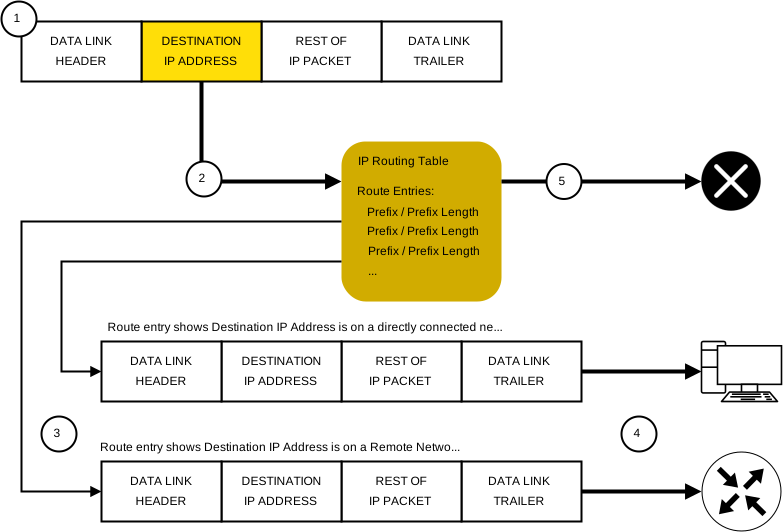
This diagram portrays the whole process of Packet Forwarding as per below:
- The data-link frame with an encapsulated IP Packet arrives on the ingress interface.
- The Router will examine the destination IP Address in the packet header and matches it against its IP Routing Table.
- The Router will find the longest matching prefix in its Routing Table.
- Afterward, the Router will encapsulate the packet in a data-link frame and forwards it out the egress interface.
- The destination could either be a device connected to the network or a next-hop Router
- If there is no matching Route entry in the Routing Table, the packet will be dropped.
3 Things a Router can do with a Packet after determining the best path
| Forwards the Packet to a Device on a Directly Connected Network |
| If the Route Table entry shows that the egress interface is a directly connected network, this indicates that the destination IP address belongs to a local device which is a directly connected network. If so, the packet will be forwarded directly to the destination device on the network. The destination device is usually an end device on the Ethernet LAN, so the packet will have to be encapsulated in an Ethernet frame. To do so, the Router will need to find out the destination MAC Address linked with the destination IP address of the packet. This process varies between an IPv4 Packet and an IPv6 Packet: IPv4 packet If it’s an IPv4 packet, the Router will check its ARP table for the destination IPv4 address and a linked Ethernet MAC Address. If there is no match, the Router will generate an ARP Request. The destination device will return an ARP Reply with its MAC Address. After obtaining the MAC Address, the Router will forward the IPv4 Packet in an encapsulated Ethernet frame with the right destination MAC Address. IPv6 packet If it’s an IPv6 packet, the Router will check its Neighbor Cache for a destination IPv6 address and a linked MAC Address. If no match is found, the Router will send an ICMPv6 NS (Neighbour Solicitation) message. The destination device will return an ICMPv6 NA (Neighbour Advertisement) message with its MAC Address. After obtaining the MAC Address, the Router will forward the IPv6 Packet in an encapsulated Ethernet frame with the right destination MAC Address. |
| Forwards the Packet to a Next-Hop Router |
| If the Routing Table entry shows that the destination IP Address is located on a remote network, this indicates that the destination IP Address of the packet belongs to a device on another network that is NOT directly connected. If so, the packet should be forwarded to a next-hop Router. The next-hop address is shown in the Routing Table Entry. If the forwarding Router and the next-hop Router are on an ethernet network, a very similar process (ARP and ICMPv6 ND) will happen for obtaining the proper destination MAC Address of the packet. The difference here is that the Router will search for the IP Address of the next-hop Router in its ARP table or Neighbour Cache rather than looking for the destination IP Address of the packet. |
| Drops the Packet (No Matching Route) |
| If no match is found between the destination IP Address and the Prefix in the Routing Table, and no default route is found/configured, the packet will then be dropped. |
[NOTE] If a Router needs to send an ARP Request for the destination IPv4 address of the packet, the packet will be forwarded to the device with the destination IPv4 Address of the packet, therefore, if a Router needs to send an ARP Request for the IPv4 address in one of its route entries, the packet will be forwarded to a next-hop Router.
End-To-End Packet Forwarding
The main responsibility of the Packet Forwarding feature is to encapsulate packets in the right data-link frame type for the outgoing interface. Like for example, the data-link frame format for a serial link could be PPP (Point-To-Point), HDLC (High-Level Data-Link Control) or any other Layer 2 protocol.
Packet Forwarding Mechanisms
Process Switching
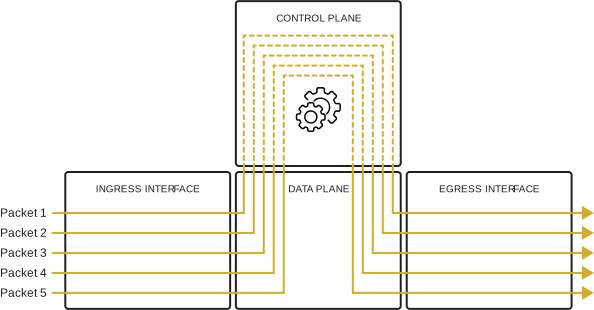
This is considered as a legacy mechanism but its still available on Cisco routers. When a packet arrives on an interface, it will be forwarded to the “Control Plane” where the CPU matches the destination address with an entry from its Routing Table, determine the exit interface and forwards the packet.
This is done for every packet, even if a stream of packets has the same destination, therefore such mechanism is very slow and not implemented in modern networks.
Fast Switching
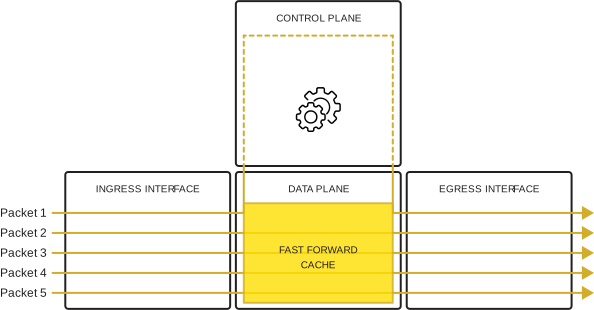
This is also a deprecated packet forwarding mechanism which was the successor of “Process Switching”. Fast Switching uses what’s called as a “Fast Forward Cache” to store next-hop information.
When a packet arrives on the interface, it will be forwarded to the control plane where the CPU searches for a match in its indexed cache. If not present, it will be process-switched and forwarded to the exit interface.
The flow details of the packet will also be stored in the Cache, thus if another packet going to the same destination arrives on the interface, the next-hop details in the cache will be re-used without CPU intervention.
Basically only the first packet of a flow will be process-switched and added to the Cache. The remaining 4 packets will be quickly processed and forwarded based on the information already in the cache.
CEF (Cisco Express Forwarding)
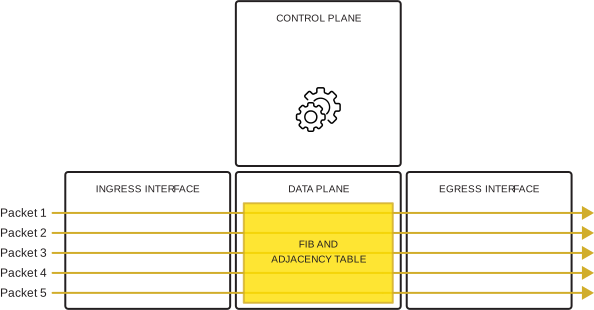
CEF (Cisco Express Forwarding) is the presently used packet-forwarding mechanism on Cisco IOS. Similar to Fast Switching, CEF also builds a form of cache, this time called a FIB (Forwarding Information Base), and Adjacency Table.
In such case, unlike fast switching, the table entries will not be packet-triggered but change-triggered like for example when something changes in the network topology.
When a network has converged, the FIB and Adjacency Table will contain all the information that a Router would have to consider when forwarding the packet.
This is the fastest forwarding mechanism up to this moment, and its selected by default on Cisco Routers and multilayer switches.
CEF builds the FIB and Adjacency Tables after the network has converged. All packets will be quickly processed in the data plane.
Analogy to describe these 3 packet-forwarding mechanisms
| Process Switching |
| This mechanism solves a problem by doing math in full, even if its the same identical problem that was just solved. |
| Fast Switching |
| This mechanism solves a problem by doing math in full the first time and remembering the answer for identical problems that were already solved. |
| CEF (Cisco Express Forwarding) |
| This mechanism solves every possible problem ahead of time in its own database |