Inter-VLAN Routing on a Layer 3 Switch – Configuration
Inter-VLAN routing can be easily achieved using the router-on-a-stick solution for a small to medium-sized network, however, a large network will require a much faster and a much more scalable method to provide inter-VLAN routing. This is where a Layer 3 Inter-VLAN Routing solution is implemented.
Layer 3 switches use hardware-based switching to achieve higher-packet processing rates than routers.
Configuration example is based on the following diagram
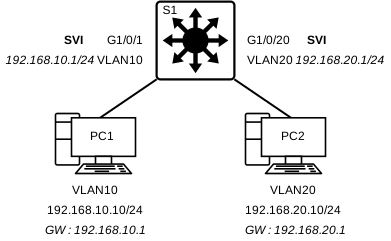
Layer 3 Switch Configuration (S1)
The VLAN configuration on the Layer 3 switch S1 can be completed in 4 Steps
| Step 1 |
| Create the VLANs and give them a name |
| Step 2 |
| Create the SVI VLAN interfaces |
| Step 3 |
| Configure Access Ports |
| Step 4 |
| Enable IP Routing |
Create the VLANs and give them a name
S1(config)# vlan [vlan-id]
S1(config-vlan)# name [vlan-name]
S1(config-vlan)# exit
S1(config)# vlan [vlan-id]
S1(config-vlan)# name [vlan-name]
S1(config-vlan)# exit
S1(config)#
Create the SVI VLAN Interfaces
S1(config)# interface vlan [vlan-id]
S1(config-if)# description [description]
S1(config-if)# ip address [ip-address] [subnet-mask]
S1(config-if)# no shutdown
S1(config-if)# exit
S1(config)#
S1(config)# interface vlan [vlan-id]
S1(config-if)# description [description]
S1(config-if)# ip address [ip-address] [subnet-mask]
S1(config-if)# no shutdown
S1(config-if)# exit
S1(config)#
Configure Access Ports
S1(config)# interface [interface]
S1(config-if)# description [description]
S1(config-if)# switchport mode access
S1(config-if)# switchport access vlan [vlan-id]
S1(config-if)# exit
S1(config)#
S1(config)# interface [interface]
S1(config-if)# description [description]
S1(config-if)# switchport mode access
S1(config-if)# switchport access vlan [vlan-id]
S1(config-if)# exit
S1(config)#
Enable IP Routing
S1(config)# ip routing
Layer 3 Inter-VLAN – Complete Configuration Example [Layer 3 Switch S1]
S1(config)# vlan 10
S1(config-vlan)# name STAFF
S1(config-vlan)# exit
S1(config)#
S1(config)# vlan 20
S1(config-vlan)# name STUDENTS
S1(config-vlan)# exit
S1(config)#
S1(config)# vlan 99
S1(config-vlan)# name MANAGEMENT
S1(config-vlan)# exit
S1(config)#
S1(config)# interface vlan 10
S1(config-if)# description Default Gateway SVI for VLAN10
S1(config-if)# ip address 192.168.10.1 255.255.255.0
S1(config-if)# no shutdown
S1(config-if)# exit
S1(config)#
S1(config)# interface vlan 20
S1(config-if)# description Default Gateway SVI for VLAN20
S1(config-if)# ip address 192.168.20.1 255.255.255.0
S1(config-if)# no shutdown
S1(config-if)# exit
S1(config)#
S1(config)# interface vlan 99
S1(config-if)# description Default Gateway SVI for VLAN99
S1(config-if)# ip address 192.168.99.1 255.255.255.0
S1(config-if)# no shutdown
S1(config-if)# exit
S1(config)#
*Jun 14 13:40:13.023: %LINEPROTO-5-UPDOWN: Line protocol on Interface Vlan10, changed state to up
*Jun 14 13:40:16.044: %LINEPROTO-5-UPDOWN: Line protocol on Interface Vlan20, changed state to up
*Jun 14 13:40:19.007: %LINEPROTO-5-UPDOWN: Line protocol on Interface Vlan99, changed state to up
S1(config)#
S1(config)# interface GigabitEthernet1/0/1
S1(config-if)# description Access port to PC1
S1(config-if)# switchport mode access
S1(config-if)# switchport access vlan 10
S1(config-if)# exit
S1(config)#
S1(config)# interface GigabitEthernet1/0/20
S1(config-if)# description Access port to PC2
S1(config-if)# switchport mode access
S1(config-if)# switchport access vlan 20
S1(config-if)# exit
S1(config)#
S1(config)# ip routing
S1(config)#
Layer 3 Switch + Router Scenario
Now Imagine that a Router has just been connected to the Layer 3 switch we’ve just configured…
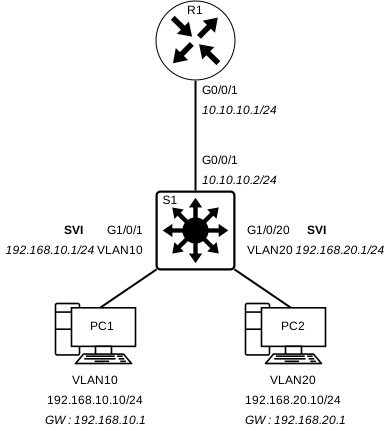
We have previously configured S1 Layer 3 switch. That very same switch is now connected to R1. R1 is using OSPF to advertise the network 10.10.10.0/24. We will need to configure Routing on our Layer 3 Switch. This can be achieved in 3 simple steps.
| Step 1 |
| Configure the routed port |
| Step 2 |
| Enable routing |
| Step 3 |
| Configure routing |
Configure the routed port
S1(config)# interface [interface]
S1(config-if)# description [description]
S1(config-if)# no switchport
S1(config-if)# ip address [ip-address] [subnet-mask]
S1(config-if)# no shutdown
S1(config-if)# exit
[NOTE] It’s important to set the interface to “no switchport” mode
Enable routing
S1(config)# ip routing
Configure routing
S1(config)# router ospf 10
S1(config-router)# network 192.168.10.0 0.0.0.255 area 0
S1(config-router)# network 192.168.20.0 0.0.0.255 area 0
S1(config-router)# network 10.10.10.0 0.0.0.3 area 0
S1(config-router)# exit
Layer 3 Inter-VLAN + Router – Complete Configuration Example [Router R1]
S1(config)# interface GigabitEthernet0/0/1
S1(config-if)# description Routed Port to R1
S1(config-if)# no switchport
S1(config-if)# ip address 10.10.10.2 255.255.255.0
S1(config-if)# no shutdown
S1(config-if)# exit
S1(config)#
S1(config)# ip routing
S1(config)#
S1(config)# router ospf 10
S1(config-router)# network 192.168.10.0 0.0.0.255 area 0
S1(config-router)# network 192.168.20.0 0.0.0.255 area 0
S1(config-router)# network 10.10.10.0 0.0.0.3 area 0
S1(config-router)# exit
S1#
*Jun 14 15:31:11.014:%OSPF-5-ADJCHG: Process 10, Nbr 10.20.20.1 on GigabitEthernet0/0/1 from LOADING to FULL, Loading Done
S1#