Router on a Stick Inter-VLAN Routing (ROS) – Configuration
You know how a Router on a Stick Inter-VLAN solution works, and the following are the steps to configure it and make it work. You will need to configure the Router and the corresponding switches with the proper VLANs
Configuration example is based on the following diagram
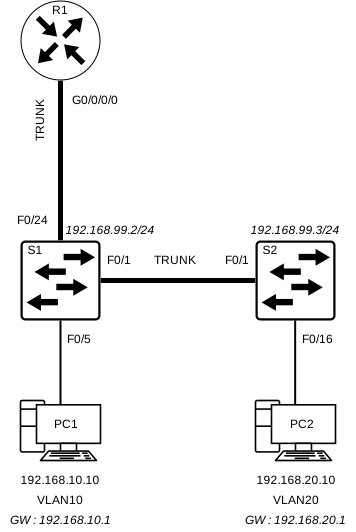
Switch Configuration (S1 / S2)
The VLAN configuration on the switch side is very simple and can be covered in 4 steps as follows
| Step 1 |
| Create the VLANs and give them a name |
| Step 2 |
| Create the management interface |
| Step 3 |
| Configure access ports for end-devices |
| Step 4 |
| Configure TRUNK ports for switch-switch communication |
Create the VLANs and give them a name
S1(config)# vlan [vlan-id]
S1(config-vlan)# name [vlan-name]
S1(config-vlan)# exit
S1(config)# vlan [vlan-id]
S1(config-vlan)# name [vlan-name]
S1(config-vlan)# exit
S1(config)#
Create the management interface
S1(config)# interface vlan [management-vlan-id]
S1(config-if)# ip address [ip-address] [subnet-mask]
S1(config-if)# no shutdown
S1(config-if)# exit
S1(config)# ip default-gateway [default-gateway-ip]
S1(config)#
Configure access ports for end-devices
S1(config)# interface [interface]
S1(config-if)# switchport mode access
S1(config-if)# switchport access [vlan-id]
S1(config-if)# no shutdown
S1(config-if)# exit
S1(config)#
Configure TRUNK ports for switch-switch communication
S1(config)# interface [interface]
S1(config-if)# switchport mode trunk
S1(config-if)# no shutdown
S1(config-if)# exit
S1(config)# interface [interface]
S1(config-if)# switchport mode trunk
S1(config-if)# no shutdown
S1(config-if)# end
Router on a Stick – Complete Configuration Example [Switch 1]
S1(config)# vlan 10
S1(config-vlan)# name STAFF
S1(config-vlan)# exit
S1(config)# vlan 20
S1(config-vlan)# name STUDENTS
S1(config-vlan)# exit
S1(config)# vlan 99
S1(config-vlan)# name MANAGEMENT
S1(config-vlan)# exit
S1(config)#
S1(config)# interface vlan 99
S1(config-if)# ip address 192.168.99.2 255.255.255.0
S1(config-if)# no shutdown
S1(config-if)# exit
S1(config)#
S1(config)# ip default-gateway 192.168.99.1
S1(config)#
S1(config)# interface range fa0/5 - 15
S1(config-if)# switchport mode access
S1(config-if)# switchport access 10
S1(config-if)# no shutdown
S1(config-if)# exit
S1(config)# interface range fa0/16 - 23
S1(config-if)# switchport mode access
S1(config-if)# switchport access 20
S1(config-if)# no shutdown
S1(config-if)# exit
S1(config)#
S1(config)# interface fa0/24
S1(config-if)# switchport mode trunk
S1(config-if)# no shutdown
S1(config-if)# exit
S1(config)# interface fa0/1
S1(config-if)# switchport mode trunk
S1(config-if)# no shutdown
S1(config-if)# exit
S1(config)#
*Jun 14 12:29:40.004: %LINEPROTO-5-UPDOWN: Line protocol on Interface FastEthernet0/24, changed state to up
*Jun 14 12:29:41.006: %LINEPROTO-5-UPDOWN: Line protocol on Interface FastEthernet0/1, changed state to up
Router on a Stick – Complete Configuration Example [Switch 2]
S2(config)# vlan 10
S2(config-vlan)# name STAFF
S2(config-vlan)# exit
S2(config)# vlan 20
S2(config-vlan)# name STUDENTS
S2(config-vlan)# exit
S2(config)# vlan 99
S2(config-vlan)# name MANAGEMENT
S2(config-vlan)# exit
S2(config)#
S2(config)# interface vlan 99
S2(config-if)# ip address 192.168.99.3 255.255.255.0
S2(config-if)# no shutdown
S2(config-if)# exit
S2(config)#
S2(config)# ip default-gateway 192.168.99.1
S2(config)#
S2(config)# interface range fa0/16 - 23
S2(config-if)# switchport mode access
S2(config-if)# switchport access vlan 20
S2(config-if)# no shutdown
S2(config-if)# exit
S2(config)#
S2(config)# interface fa0/1
S2(config-if)# switchport mode trunk
S2(config-if)# no shutdown
S2(config-if)# exit
S2(config)#
*Jun 14 12:37:50.017: %LINEPROTO-5-UPDOWN: Line protocol on Interface FastEthernet0/1, changed state to up
Router Configuration (R1)
As explained earlier, when using the Router on a Stick solution, we will need to create what’s known as a “sub-interface” on our primary Router interface for each VLAN to be routed.
A sub-interface is simply the physical interface followed by a period (.) and a sub-interface number. It is highly recommended to match the sub-interface number with the VLAN ID.
Each sub-interface will then be required to be configured with the dot1q encapsulation command to support VLANs using the 802.1Q traffic tag.
It’s also highly recommended to change the native VLAN from 1 to some other number. To do this we will use the “native” keyword
Each and every sub-interface is required to have an IP address and a subnet mask. These values will configure the IPv5 addressing of the sub-interface which will typically serve as the default gateway for the corresponding VLAN
It’s very important to issue the “no shutdown” command on the primary interface since all the sub-interfaces will be disabled if the physical interface is not enabled
We will be using VLANs 10, 20 and 99 on R1 G0/0/0 in the following configuration
Create a sub-interface
R1(config)# interface [interface].[subinterface]
Configure 802.1Q (dot1q) encapsulation on the sub-interface
R1(config-subif)# encapsulation dot1Q [vlan-id]
Bind an IP Address and a Subnet Mask to the sub-interface
R1(config-subif)# ip address [ip-address] [subnet-mask]
Give the sub-interface a description (optional)
R1(config-subif)# description [description]
Enable the Primary Interface
R1(config)# interface [interface]
R1(config-if)# description [description]
R1(config-if)# no shutdown
Router on a Stick – Complete Configuration Example [Router R1]
R1(config)# interface G0/0/0.10
R1(config-subif)# description Default Gateway for STAFF VLAN 10
R1(config-subif)# encapsulation dot1Q 10
R1(config-subif)# ip address 192.168.10.1 255.255.255.0
R1(config-subif)# exit
R1(config)#
R1(config)# interface G0/0/0.20
R1(config-subif)# description Default Gateway for STUDENTS VLAN 20
R1(config-subif)# encapsulation dot1Q 20
R1(config-subif)# ip address 192.168.20.1 255.255.255.0
R1(config-subif)# exit
R1(config)#
R1(config)# interface G0/0/0.99
R1(config-subif)# description Default Gateway for MANAGEMENT VLAN 99
R1(config-subif)# encapsulation dot1Q 99
R1(config-subif)# ip address 192.168.99.1 255.255.255.0
R1(config-subif)# exit
R1(config)#
R1(config)# interface G0/0/0
R1(config-if)# description Trunk link to Switch 1
R1(config-if)# no shutdown
R1(config-if)# end
R1#
*Jun 14 12:40:50.012: %LINK-3-UPDOWN: Interface GigabitEthernet0/0/0, changed state to down
*Jun 14 12:41:51.041: %LINK-3-UPDOWN: Interface GigabitEthernet0/0/0, changed state to up
*Jun 14 12:41:56.004: %LINEPROTO-5-UPDOWN: Line protocol on Interface GigabitEthernet0/0/0, changed state to up